(Case study 05/11)
Inday
UX case study · Product design · Web development · Web app · Employee and HR admin
One place for the working day, from the morning clock-in to the payslip at the end of the month. I named it, designed it and built it, and set it up for the HR team at TrueSpace.
- Client
- TrueSpace, office leasing
- Product
- HR web app for employees and HR
- My role
- UX, UI, brand and development, solo
- Built with
- JavaScript, Supabase, Netlify
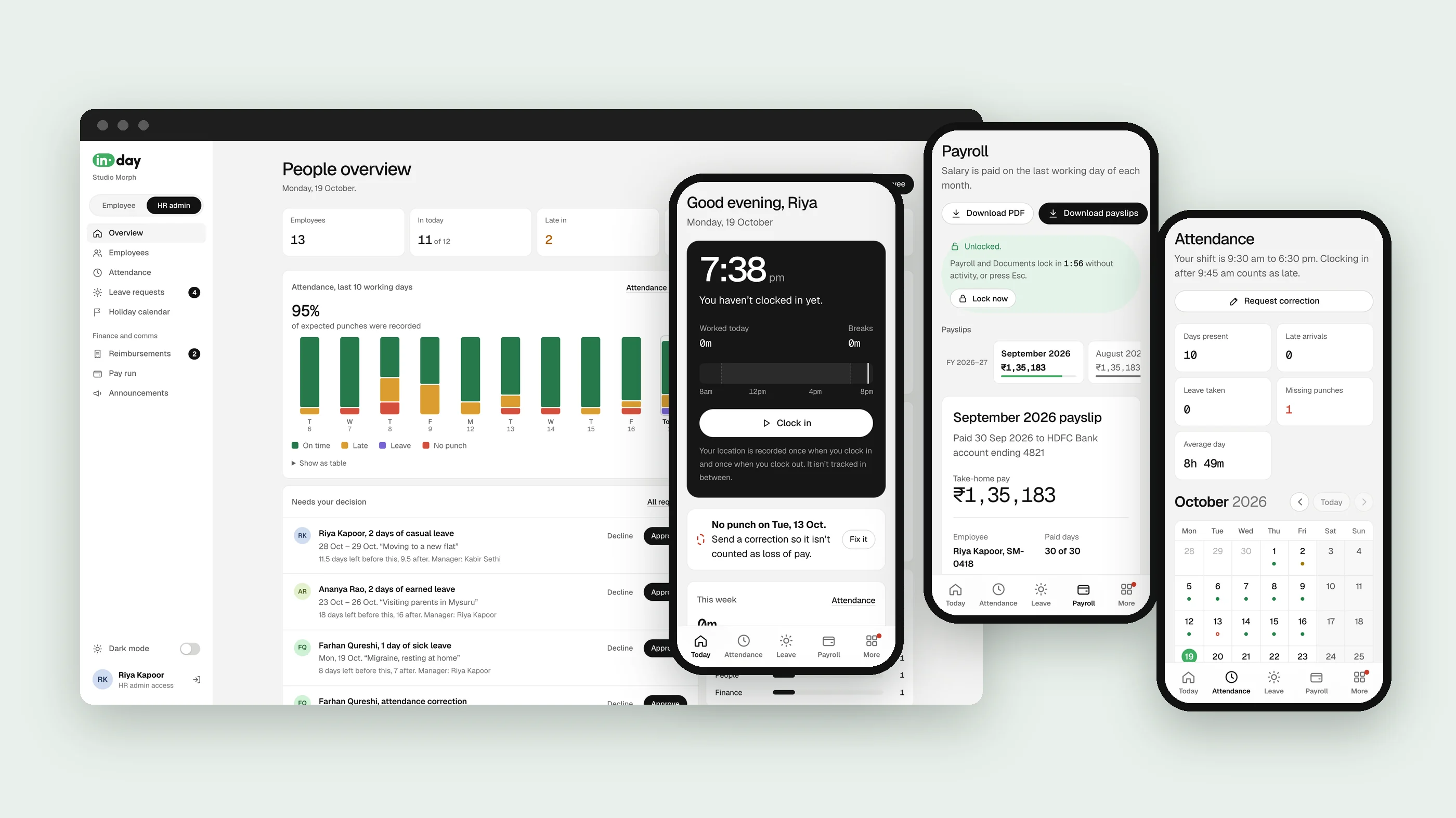
Two people open it. One app has to suit both.
An employee opens Inday to clock in, check their leave and see what they were paid. HR opens it to run the month: who came in, who is away, what needs approving and what goes out on payday.
The brief was everything an HR team needs at the end of a month, in one place: attendance, leave, claims, holidays and an Indian pay run with EPF and TDS, down to a payslip you can download as a PDF.
The UX problem was the opposite of the feature list. The more Inday could do, the more each person had to be shown only their part of it.
- Clock in and out
- Attendance calendar
- Corrections
- Leave and balances
- Approvals
- Reimbursements
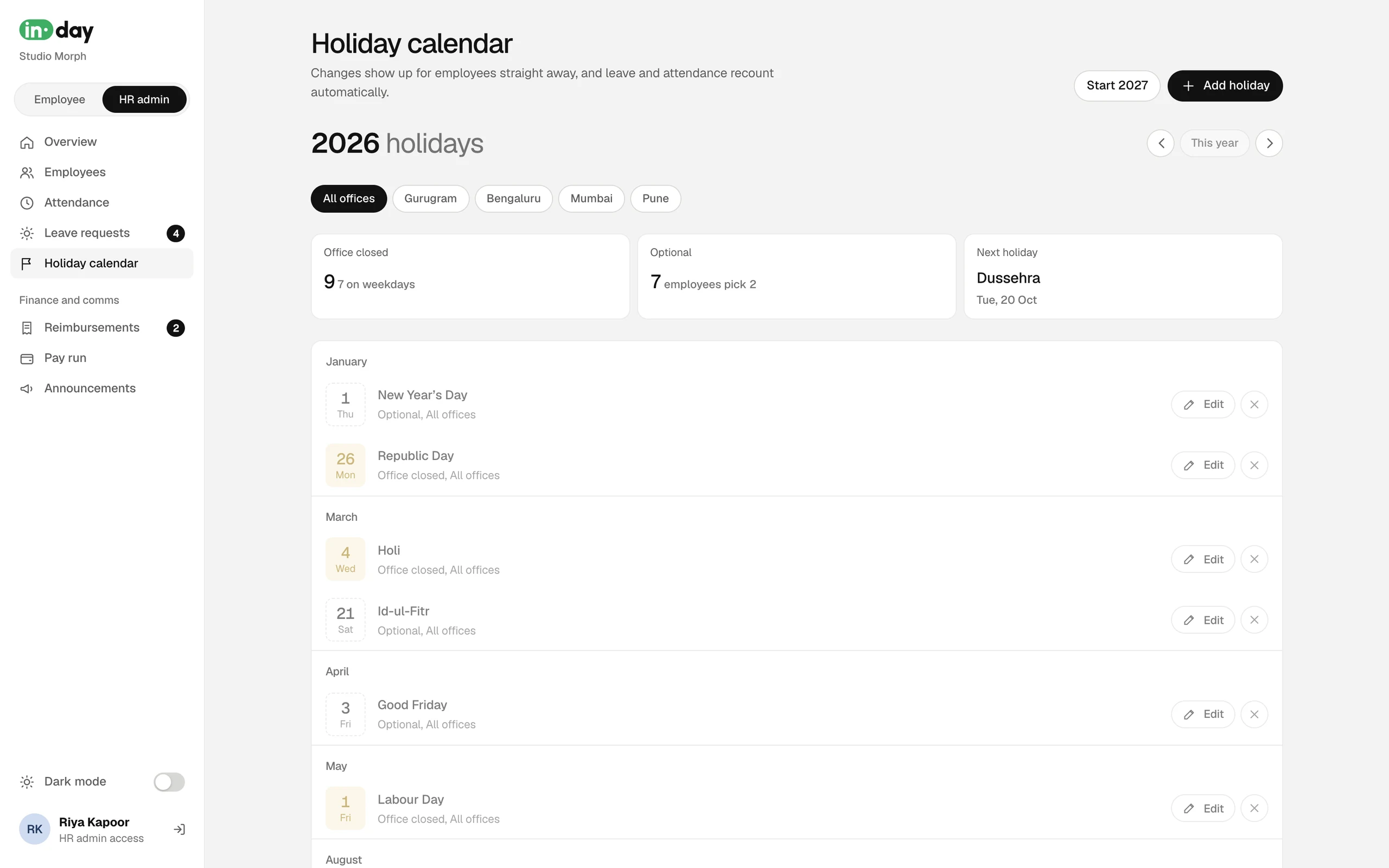
- Holiday calendar
- Payslips
- Pay run
- Indian payroll: EPF and TDS
- PDF payslips
- Employee onboarding
- Access roles
- Announcements
- Documents
- PIN and Touch ID lock
- Dark mode
- CSV exports
- 01
UX and product design
Mapped the roles, the information architecture and the flows, set the design rules and designed every screen on the employee and HR sides, on phone and desktop.
- 02
Brand and development
Named it, built the logo from a real typeface, then built the web app, the Supabase database and its access rules, the payroll maths and the PDF payslips.
Try it
Use it, don't just look at it
Inday is one web app that works on any screen. This is the working demo, on sample data for a made-up company: see it on a phone or on a laptop.
Sample data only. Anything you change stays in your browser. On the laptop, the Employee and HR admin switch at the top left swaps sides. The payroll lock asks you to set any 4-digit PIN.
Who it's for
Four roles, four reasons to open it
I started from the people, not the features: who opens Inday, what they came to do, and what would make them close it happy.
Employee
Clock in, see the month, ask for leave, claim expenses, read a payslip. Mostly on a phone, often in a hurry.
- Opens it: every working day
Manager
Everything an employee does, plus their team's requests: leave, corrections and claims waiting on them.
- Opens it: when something is waiting
HR admin
The whole company: people, attendance, holidays and the pay run. At a desk, with time to check.
- Opens it: daily, and hard at month end
Accounts
Checks claims after managers approve them, then pays them with salary or by bank transfer.
- Opens it: when claims are ready
Information architecture
Two sides, one switch
Inday is one app with two sides. Everyone has the employee side. Managers get Approvals on it, and HR admins get a switch to the HR side. The switch is the only place the two meet, so nobody has to learn a second app.
Employee side
Everyone
- TodayThe clock, the shift and anything to fix
- AttendanceThe month as a calendar, corrections
- LeaveBalances, requests, the team's calendar
- PayrollPayslips and tax, behind a lock
- ReimbursementsClaims and where each one is
- DocumentsLetters and tax forms, behind the same lock
- HolidaysThe office calendar, optional days to pick
- PeopleWho's who in the company
- ApprovalsLeave, corrections and claims from your teamManager
- ProfileDetails, password, privacy and appearance
HR side
HR admins
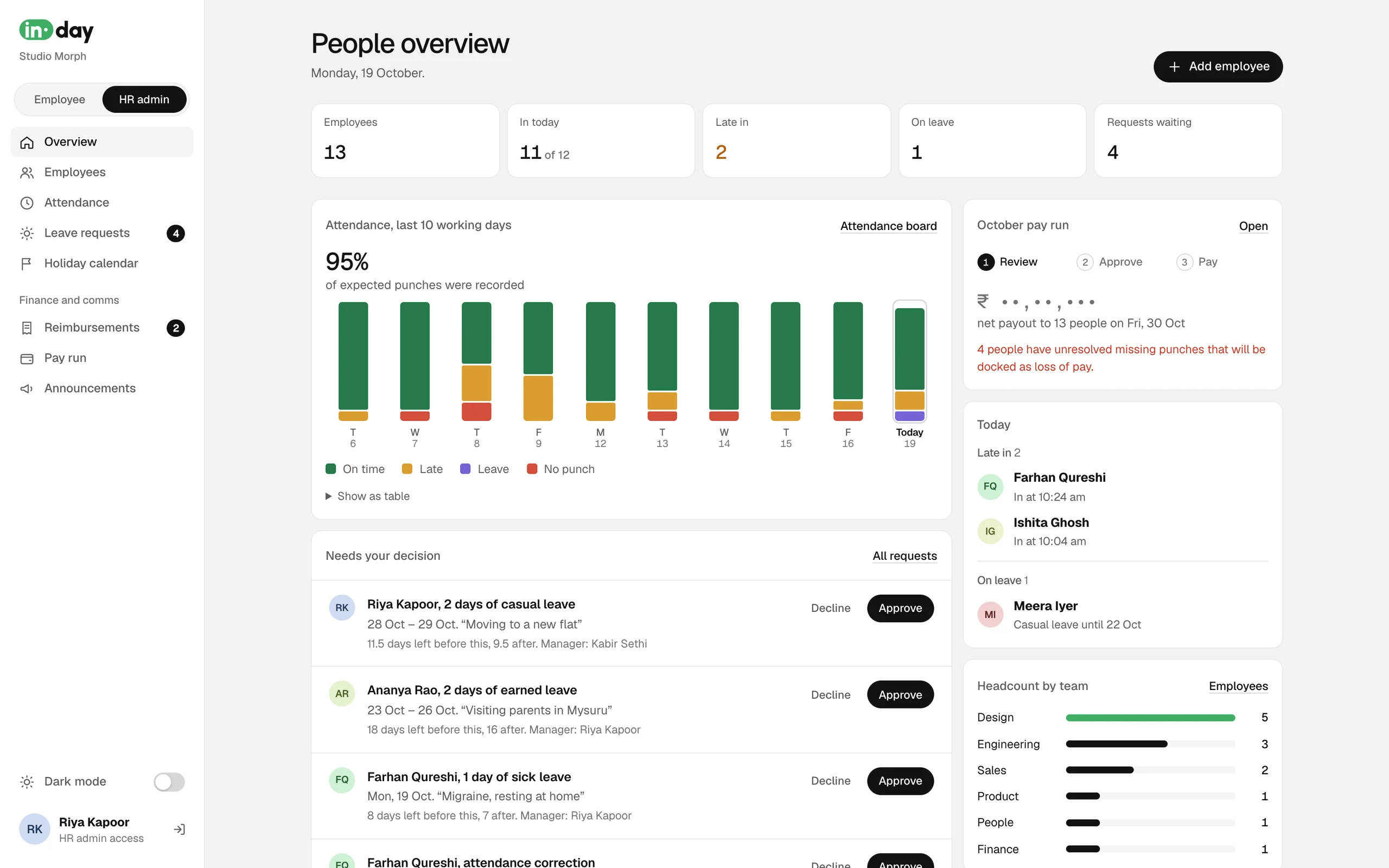
- OverviewWho is in, who is late, what needs a decisionHR
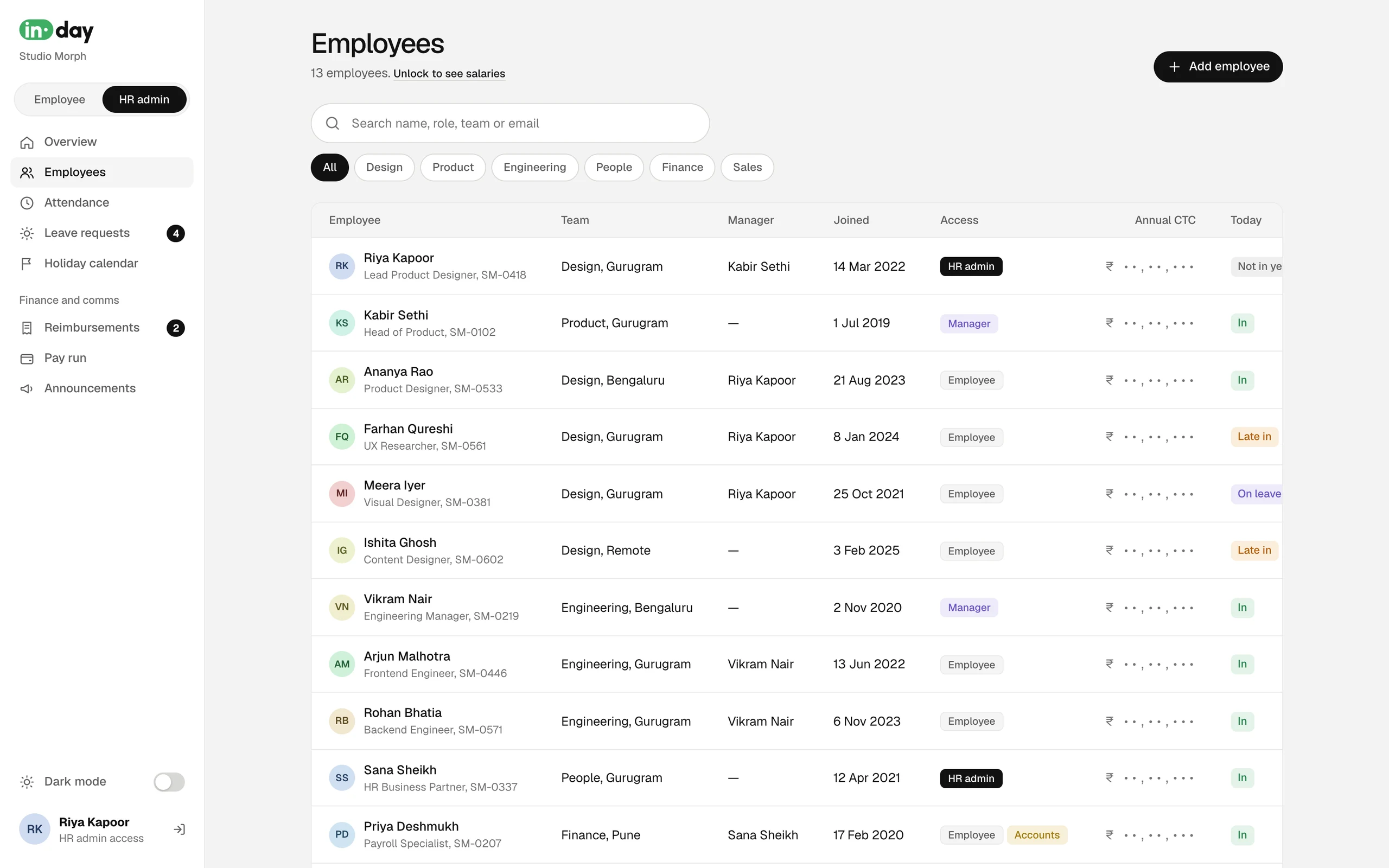
- EmployeesThe company, onboarding and accessHR
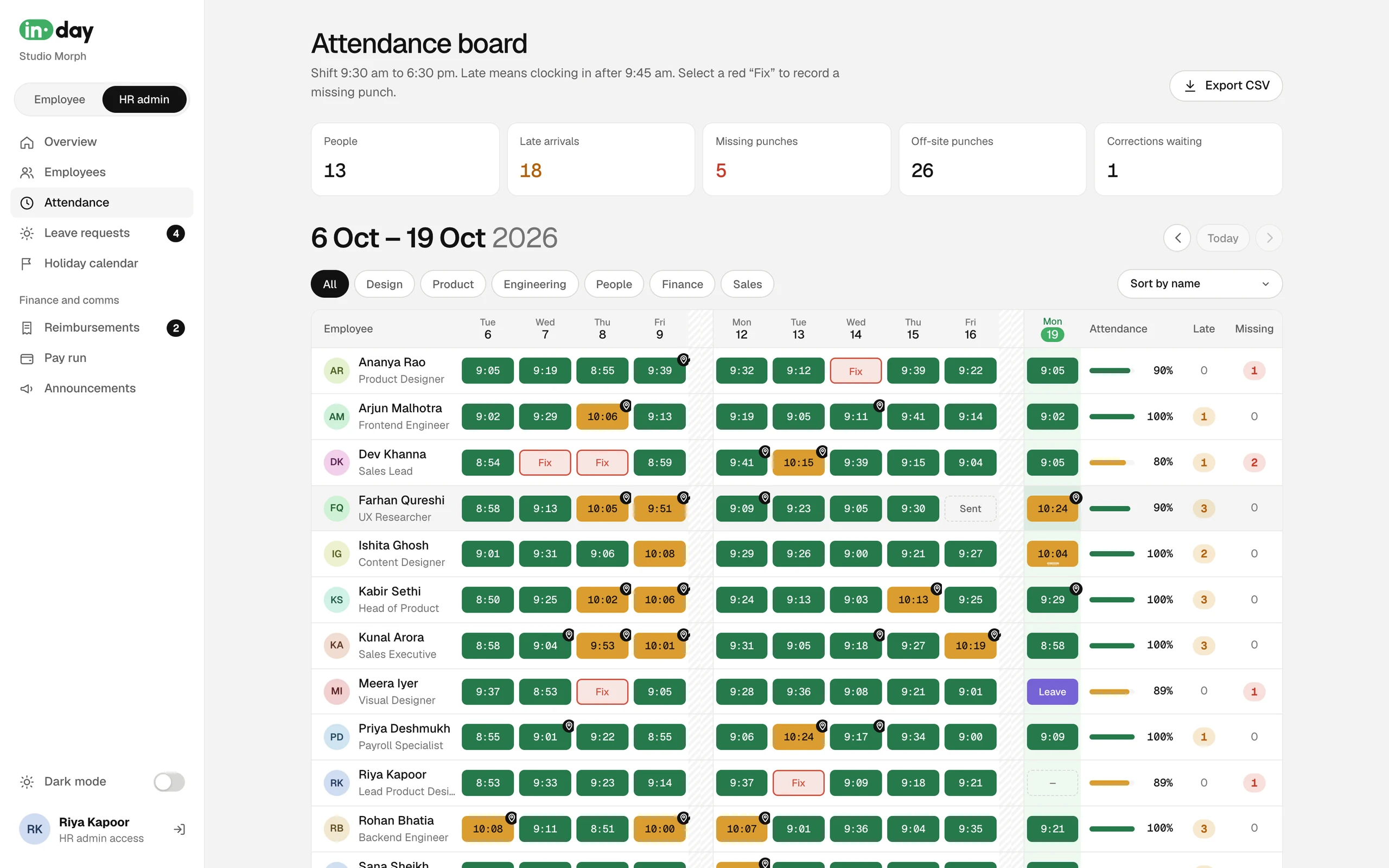
- Attendance boardTwo weeks of punches, fixes and exportsHR
- Leave requestsEverything waiting, approved and pastHR
- Holiday calendarHolidays by office, with their effectHR
- ReimbursementsVerify and pay claimsAccounts
- Pay runReview, approve, payHR
- AnnouncementsNews that lands on everyone's TodayHR
User flows
Five flows that run the month
Every flow ends in a state someone else can see. That was the rule: no request disappears into an inbox, and every step says who has it now.
Flow 01
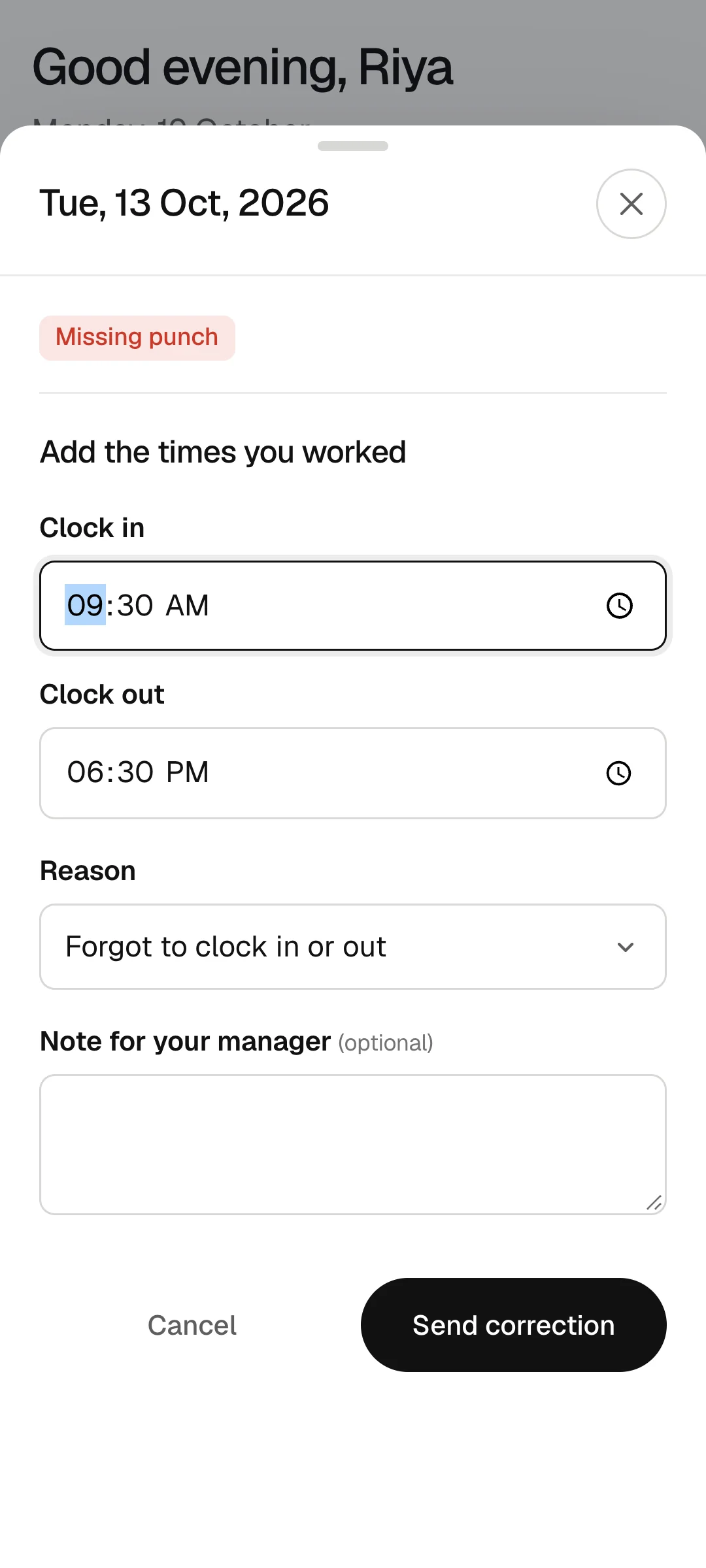
A missed punch, before payday
Fix the gap before it costs a day's pay, without HR chasing anyone.
- 01 Inday
Flags the missing punch
The day turns red on the calendar, and a banner on Today says what it will cost.
- 02 Employee
Taps Fix it
Adds the times they actually worked and a reason, in one sheet.
- Sent to their manager
- 03 Manager
Approves the correction
Sees the times and the reason next to the day it fixes.
- Approve: the day counts
- Decline: it stays missing
- 04 Inday
Updates the month
The day is counted and the banner disappears.
- 05 HR
Checks at pay run
Anything still missing shows as loss of pay, with a Waive button for genuine cases.
Flow 02
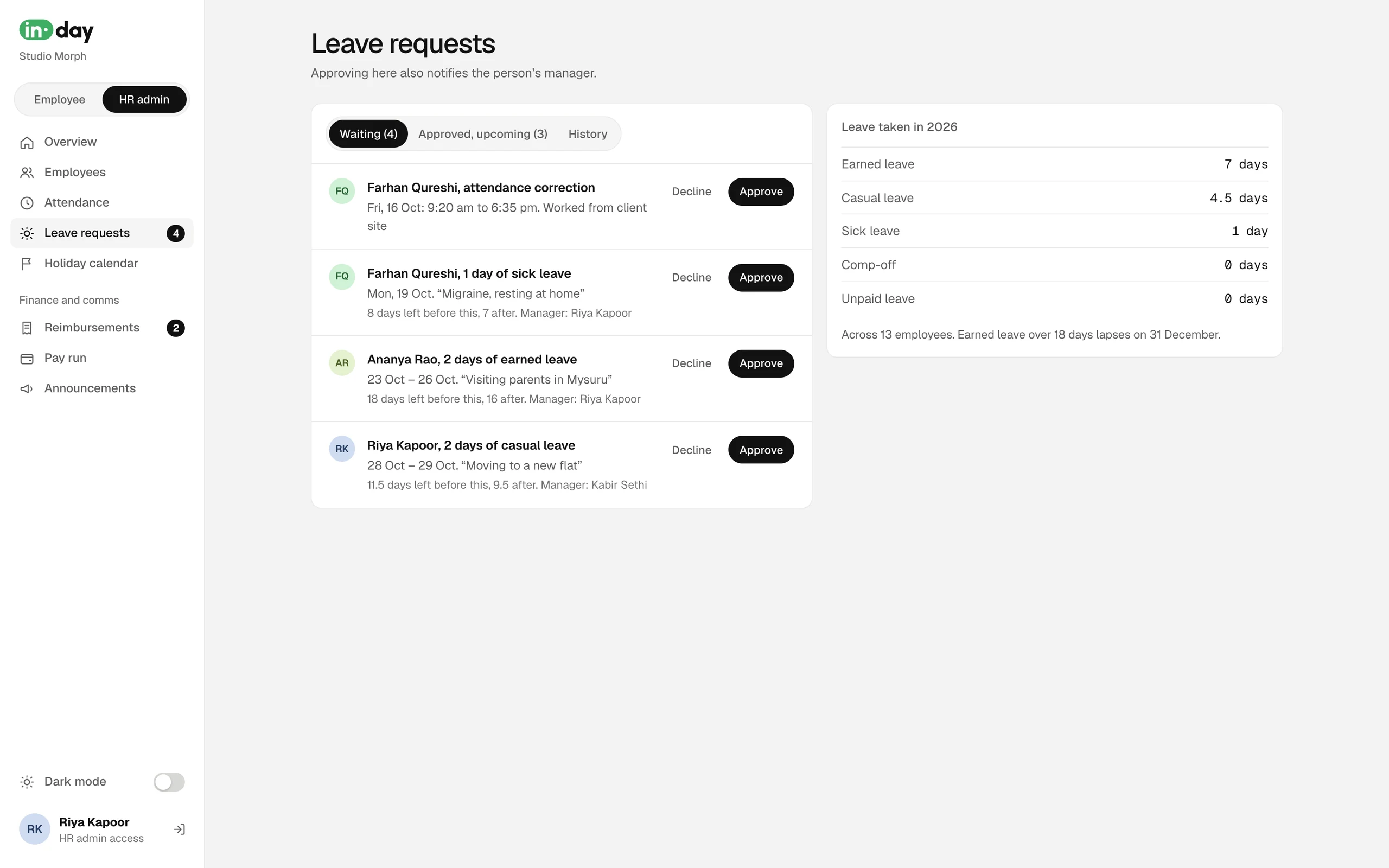
Leave, from ask to calendar
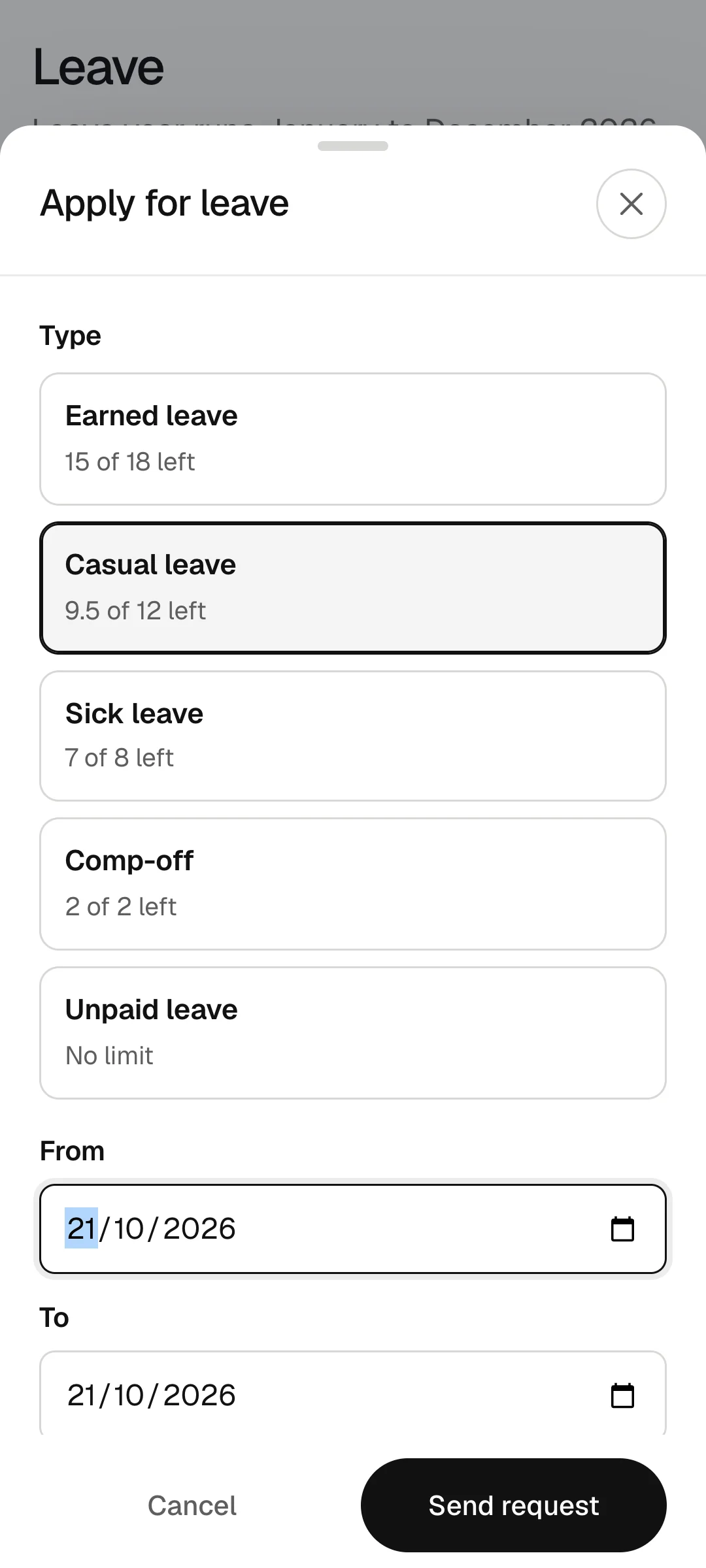
Ask once, see the answer, and see the effect on your balance before you send.
- 01 Employee
Applies for leave
Picks the type and the days. The sheet shows the balance left after it and who will approve.
- Can withdraw while it waits
- 02 Manager
Decides
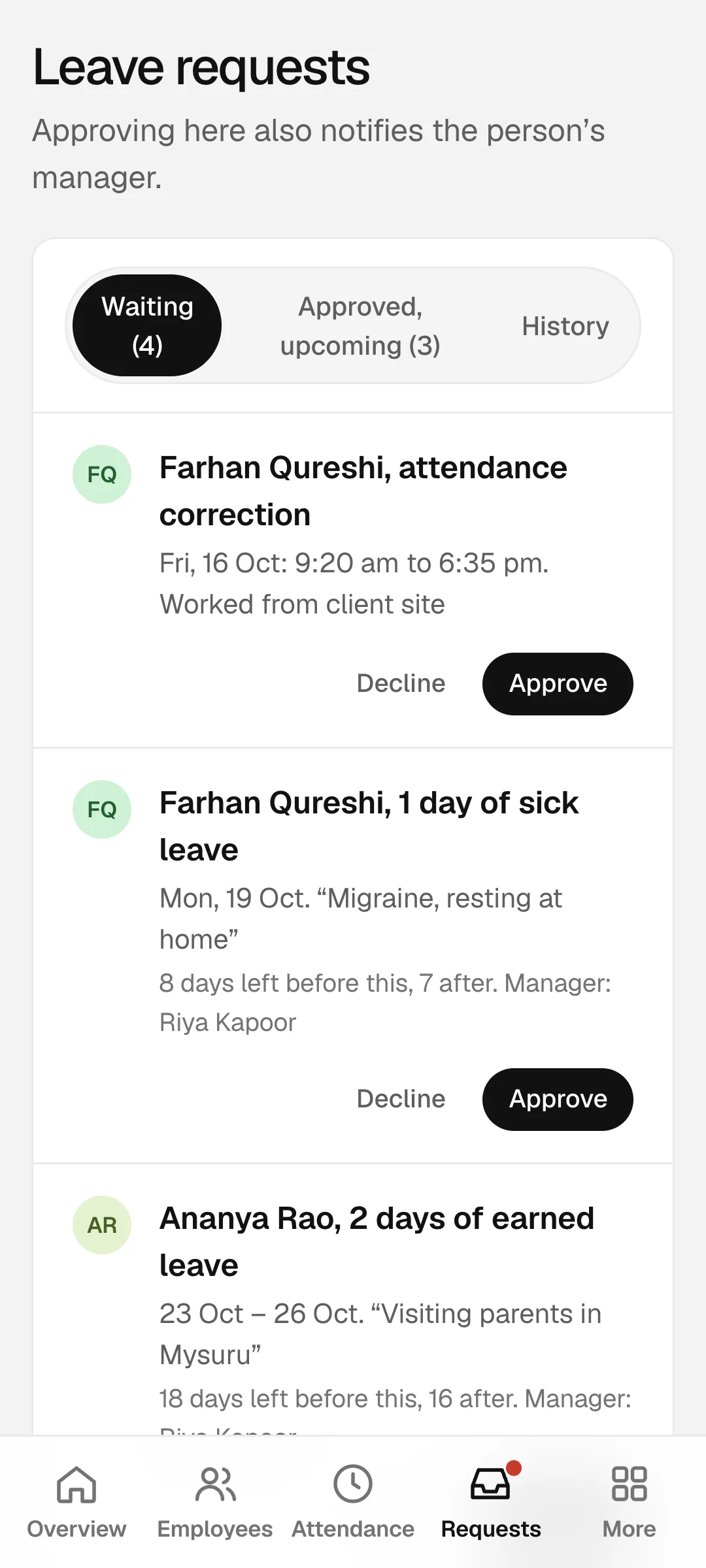
The request shows the reason, and the days left before and after it.
- Approve
- Decline
- 03 Inday
Updates everything
Balance, the employee's calendar, the team calendar and HR's list change together.
- 04 HR
Sees it in Leave requests
Waiting, approved and past, for the whole company.
Flow 03
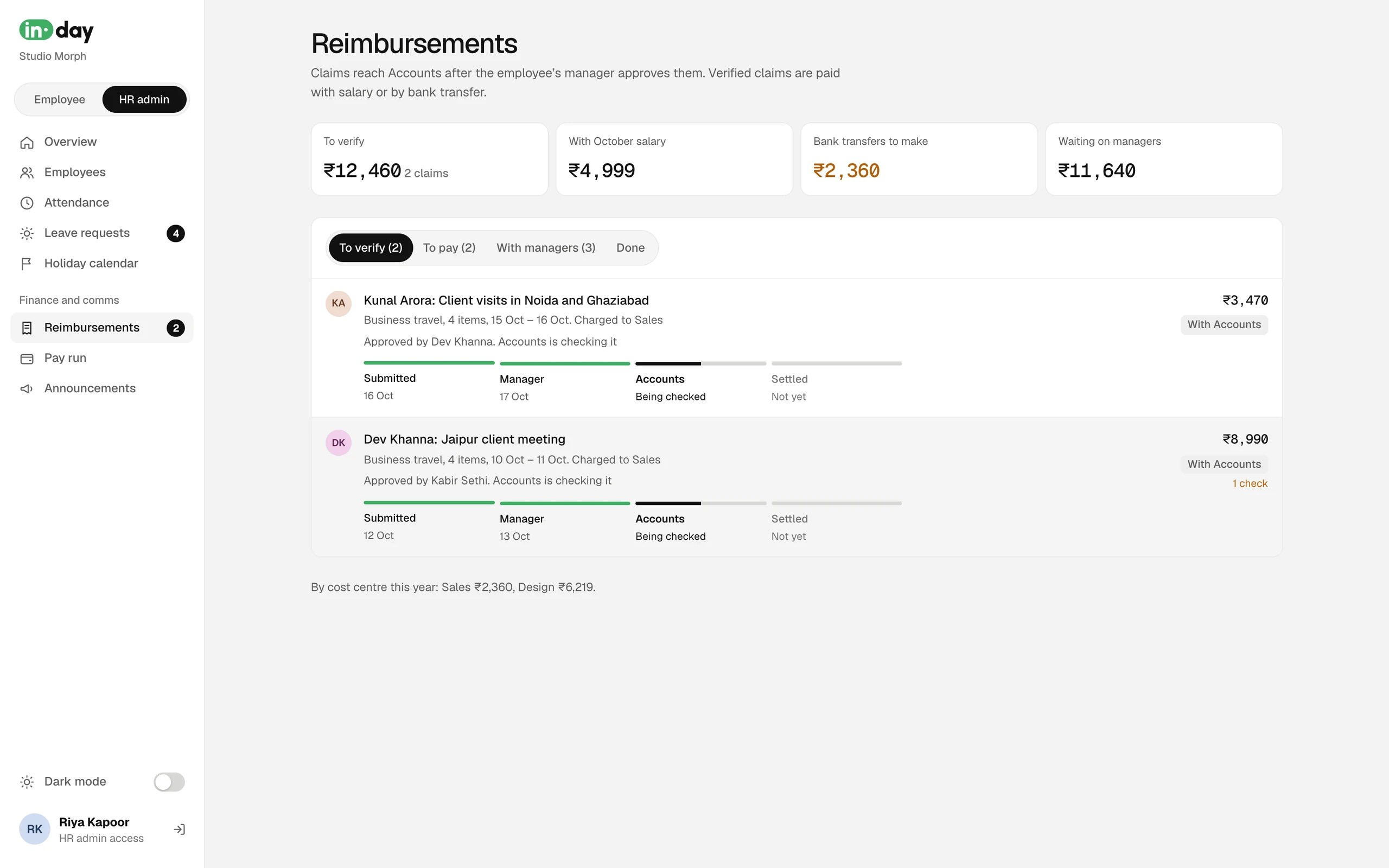
A reimbursement, from receipt to payout
Make the path of the money visible, so nobody asks "where is my claim?"
- 01 Employee
Makes a claim
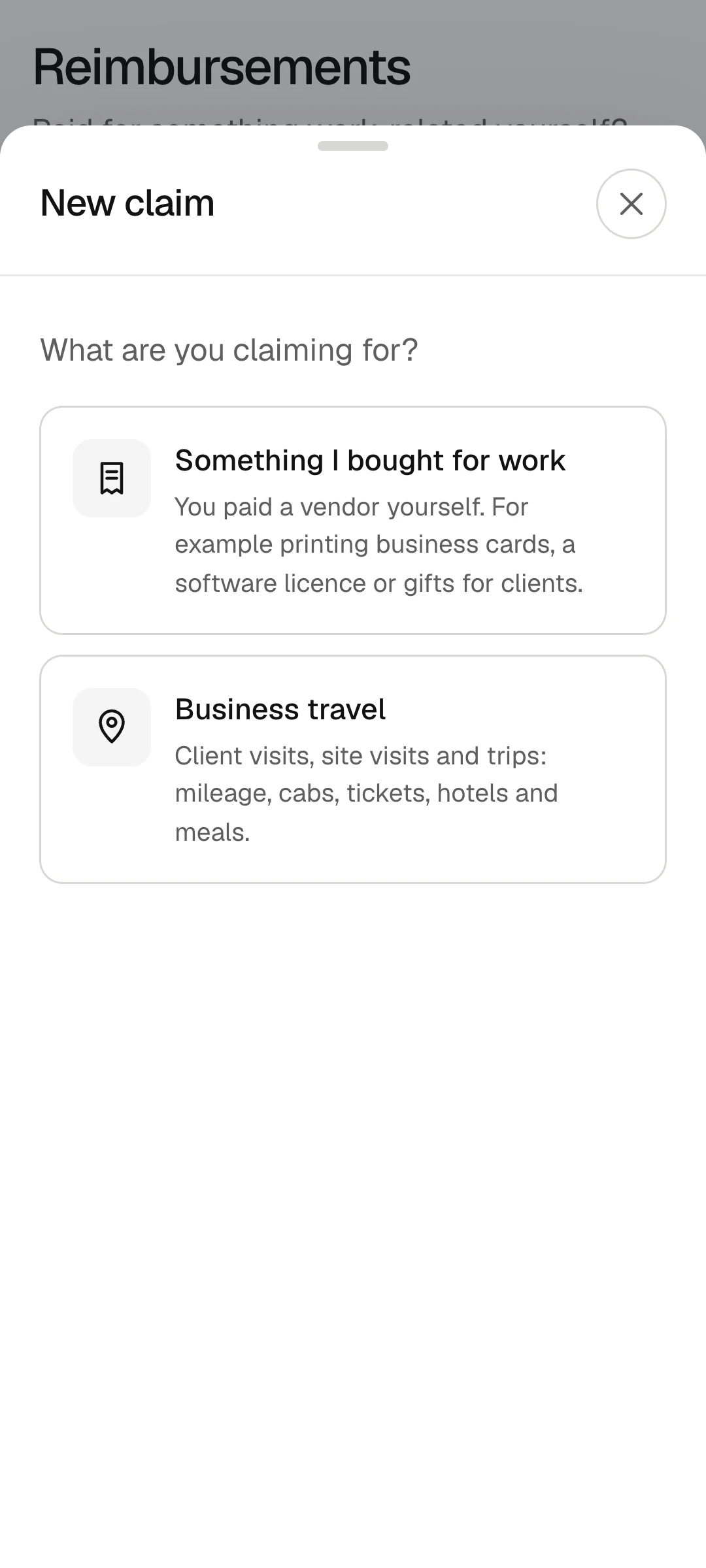
A purchase, or travel with several items: mileage, cabs, tickets, hotel and meals.
- 02 Manager
Approves
Policy flags are shown first, like a meal over the limit.
- Approve
- Return with a note
- Reject with a note
- 03 Accounts
Verifies
Checks the bills and chooses how it is paid.
- With salary
- By bank transfer
- 04 Inday
Marks it paid
With the pay run, or when Accounts records the transfer reference.
Flow 04
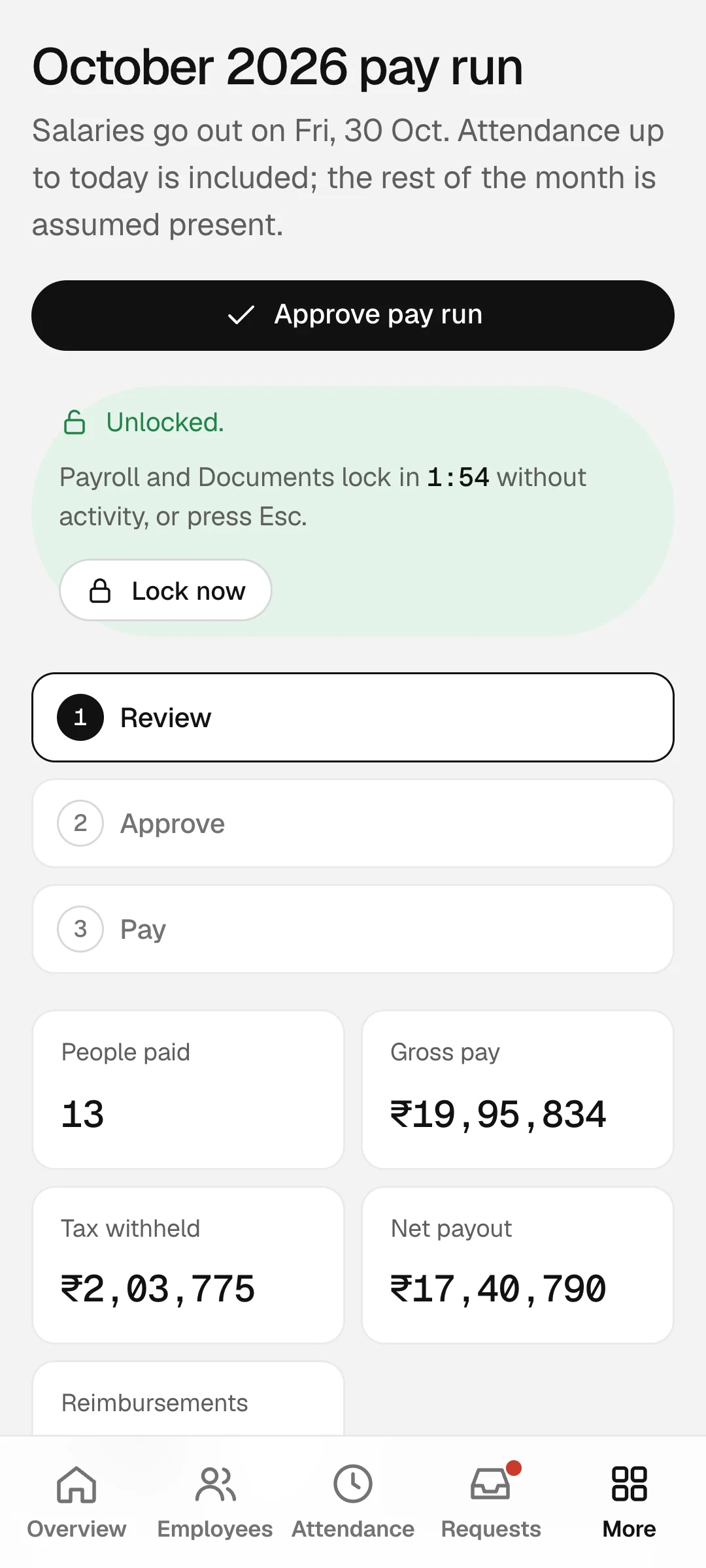
The pay run
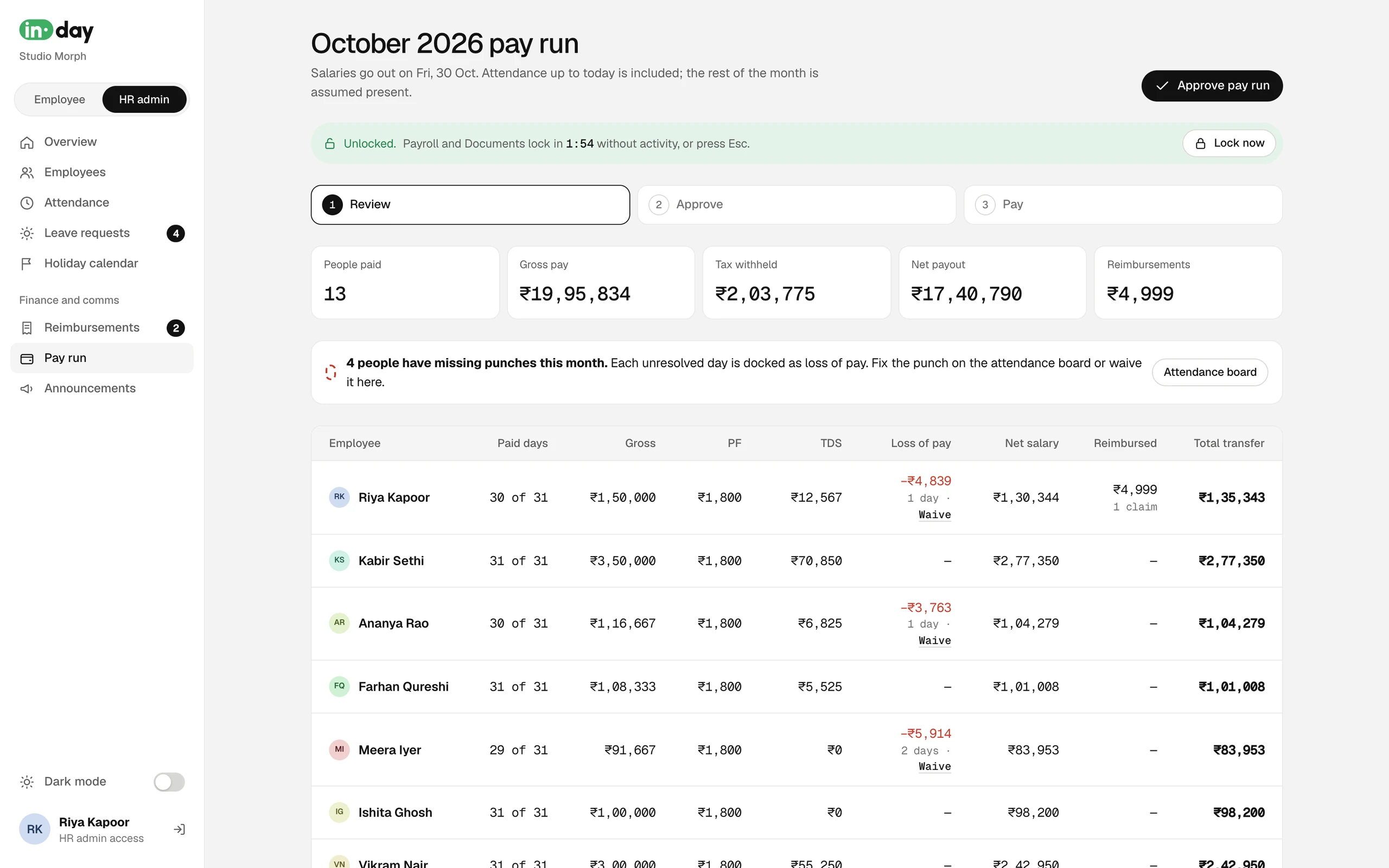
Three steps with nothing hidden: what everyone gets, why, and what changed.
- 01 HR
Reviews
Paid days, gross, PF, TDS and loss of pay for every person, with missing punches called out.
- Waive a day
- Open the attendance board
- 02 HR
Approves
Signs off the month's numbers once nothing is left to fix.
- 03 HR
Pays
Salaries go out on the last working day.
- 04 Inday
Publishes payslips
Payroll claims are marked paid at the same moment.
- 05 Employee
Reads the payslip
Behind their PIN or Touch ID, and as a PDF.
Flow 05
A new joiner
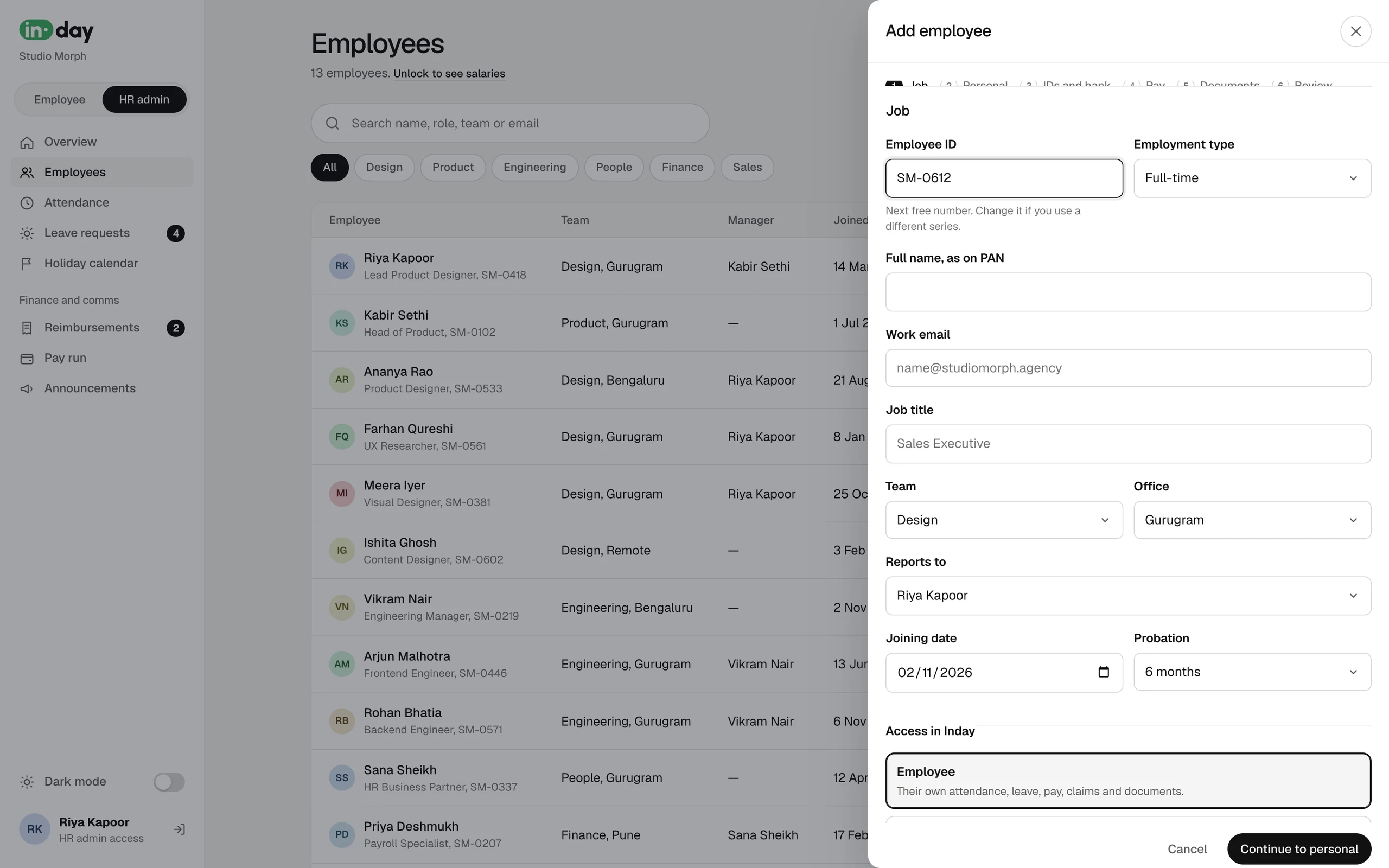
One wizard instead of a form and five follow-up emails.
- 01 HR
Adds an employee
Six steps: job, personal, IDs and bank, pay, documents, review.
- PAN format checked
- IFSC fills in the bank
- Account number typed twice
- 02 Inday
Creates the record
Takes the next free employee ID, previews the salary breakup and lists the documents still to come.
- 03 HR
Creates their login
A work email and a first password.
- 04 Employee
Signs in
Lands on Today, and changes the password from their profile.
Strategy
Three decisions shaped the whole product
Access decides what you see
Nobody picks a role at sign-in. HR sets each person as Employee, Manager or HR admin, and the menus follow. You can't change your own access, and the last HR admin can't be removed.
Pay stays behind a lock
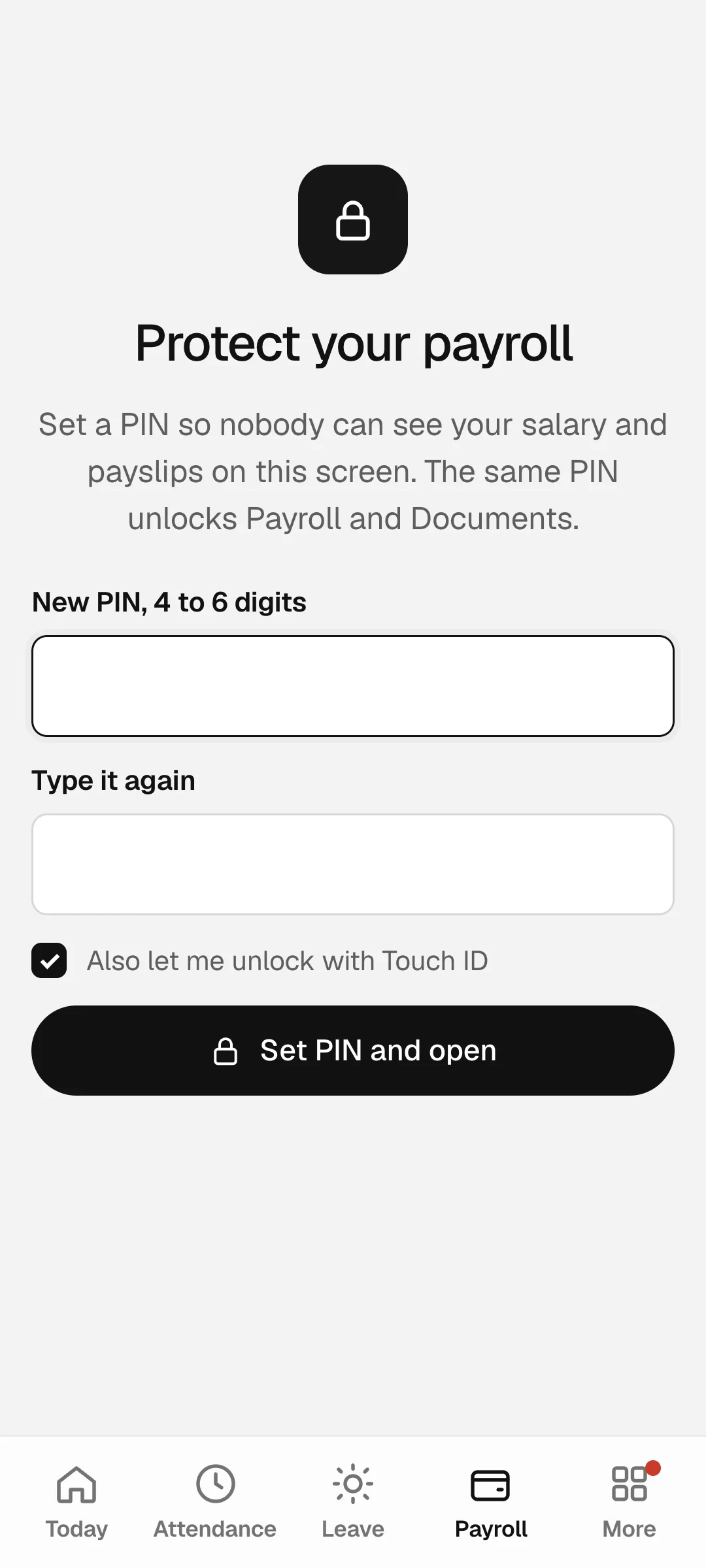
Salaries, payslips and documents sit behind a PIN or Touch ID. They lock again after a few idle minutes, when you leave the page or press Esc, and blur when you switch windows.
Cheap to run, ready to grow
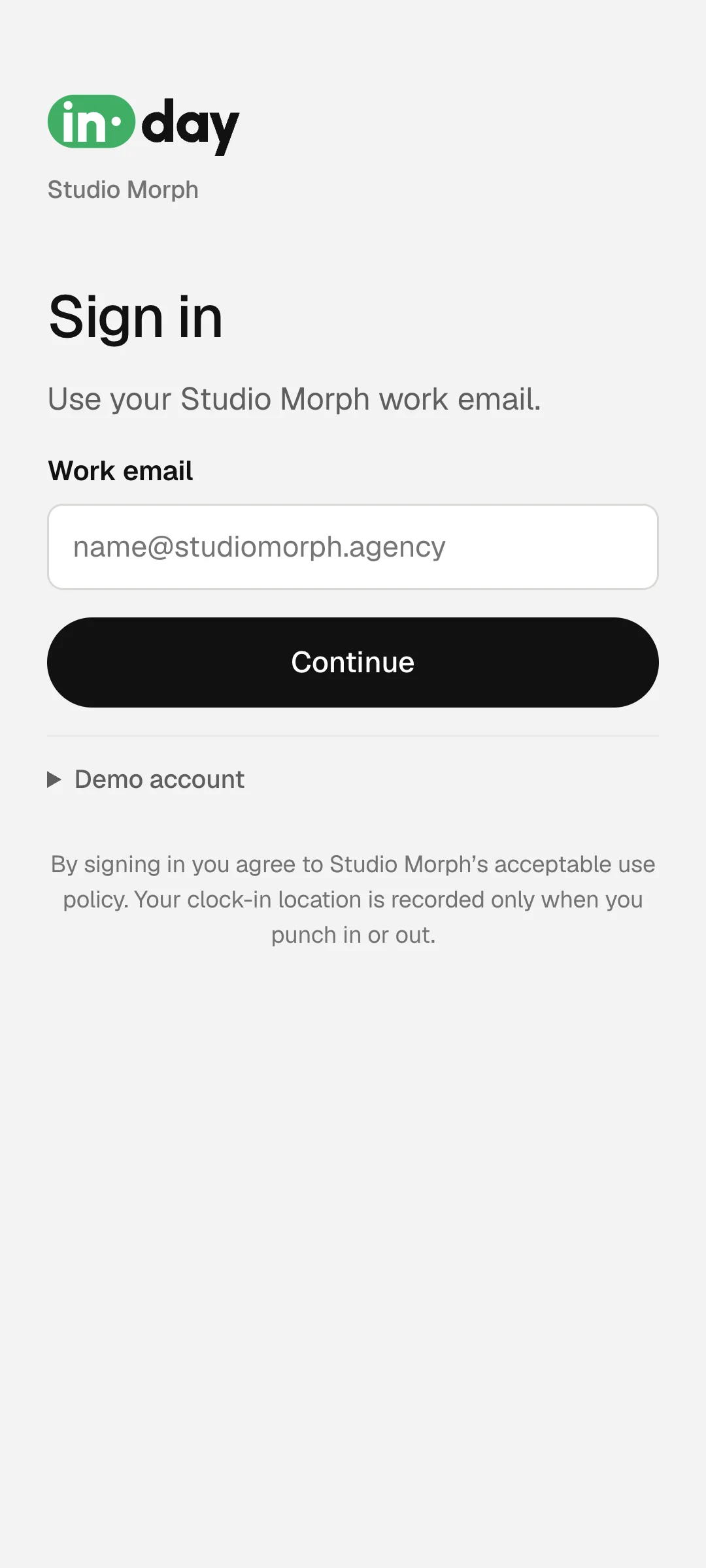
TrueSpace wanted a low running cost to start. Phase one signs in with a work email and password, and HR resets forgotten ones. Google and Microsoft sign-in are built and parked for phase two.
Design theory
A calm canvas, and one green
HR software is usually loud: tables, badges and colour everywhere. Inday is the opposite. The canvas stays grey and quiet, so the one thing that matters on each screen is easy to find.
One green
Green marks what is live: the clock, the active step, today. Everything else is black, white and grey.
Colour means status
Late is amber, leave is violet, holidays are gold and a missing punch is red. Each colour has one meaning, everywhere in the app.
A calendar people already know
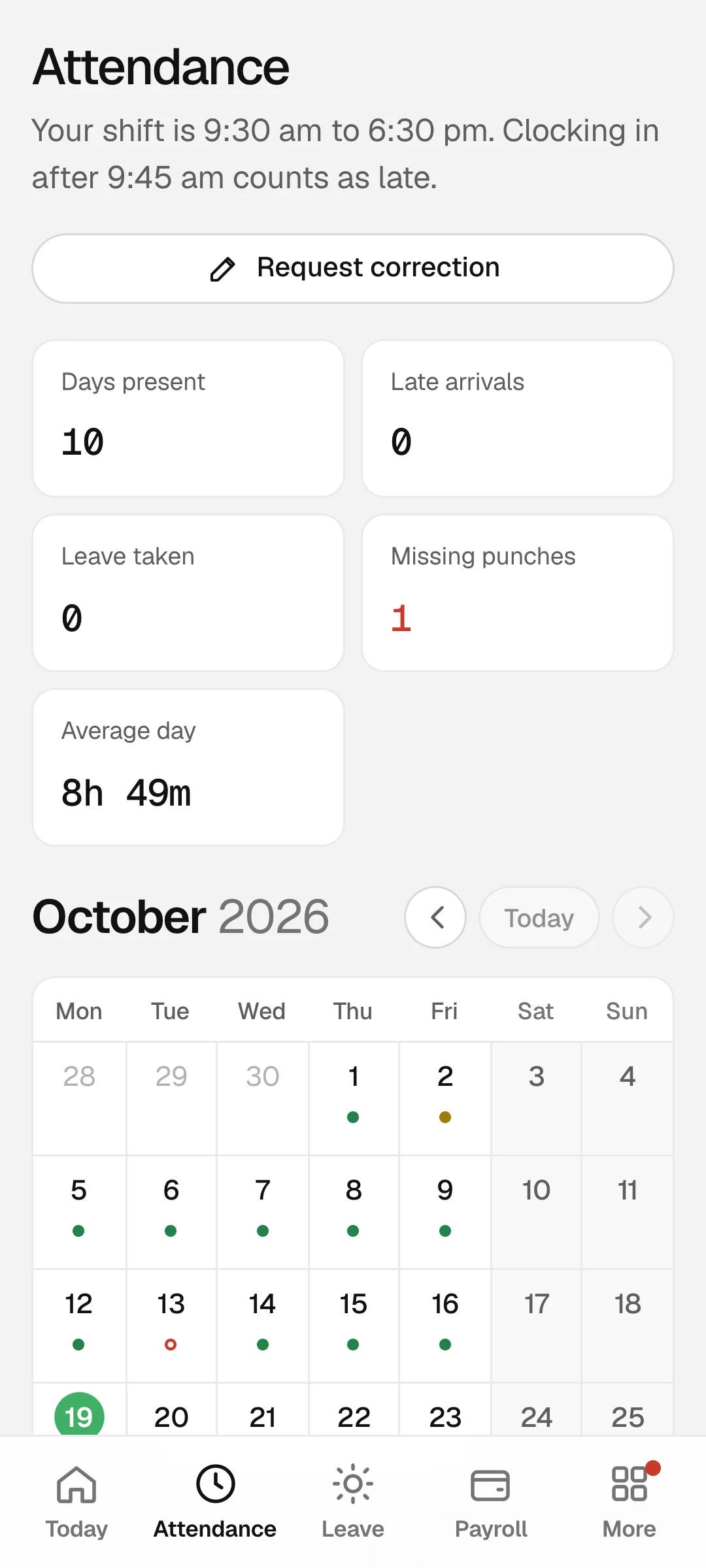
The attendance month is laid out like a phone calendar: today in a green circle, days as small pills, and a total for each week.
Numbers in even widths
Times and rupees use tabular digits, so columns of pay and hours line up and can be compared at a glance.
Undo, not are-you-sure
Edits and deletes happen straight away with an undo. Only pay is protected by a lock, because that is where a mistake costs money.
Phone first for employees
Employees mostly open Inday on their phone, so their side has a bottom tab bar. The HR side is built for a desk, with tables and boards.
Employee side
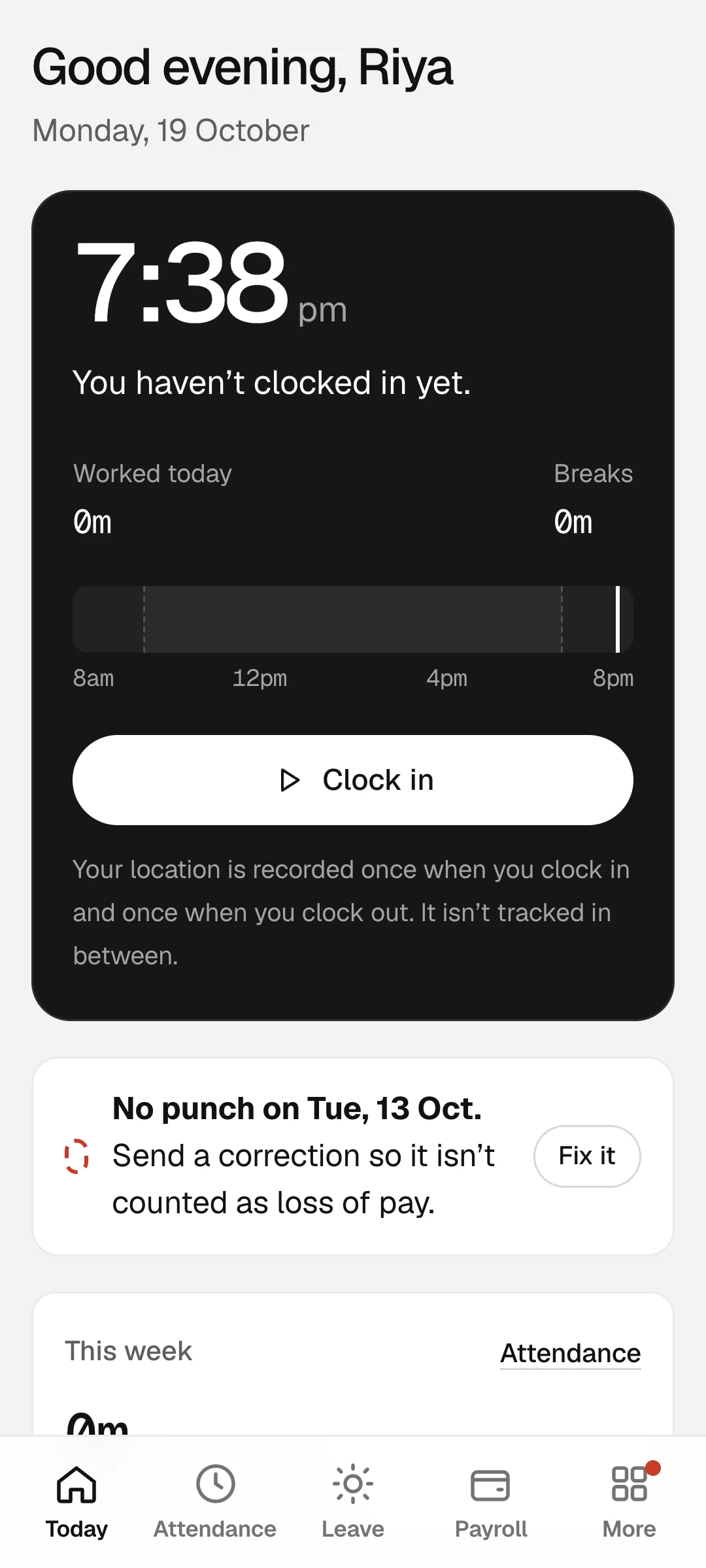
Your day, in your pocket
The employee side opens on today: the clock, the shift and anything that needs fixing, like a missed punch from last week.
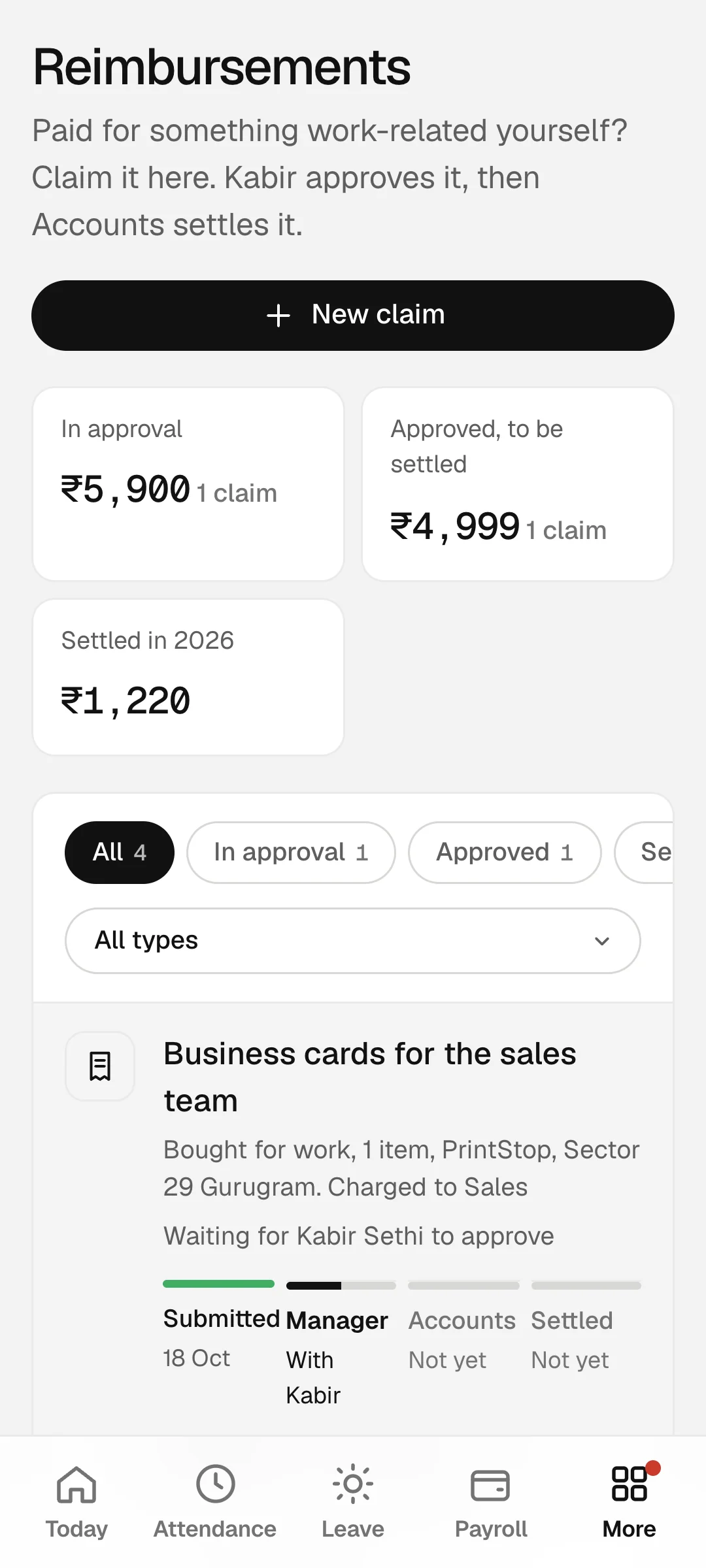
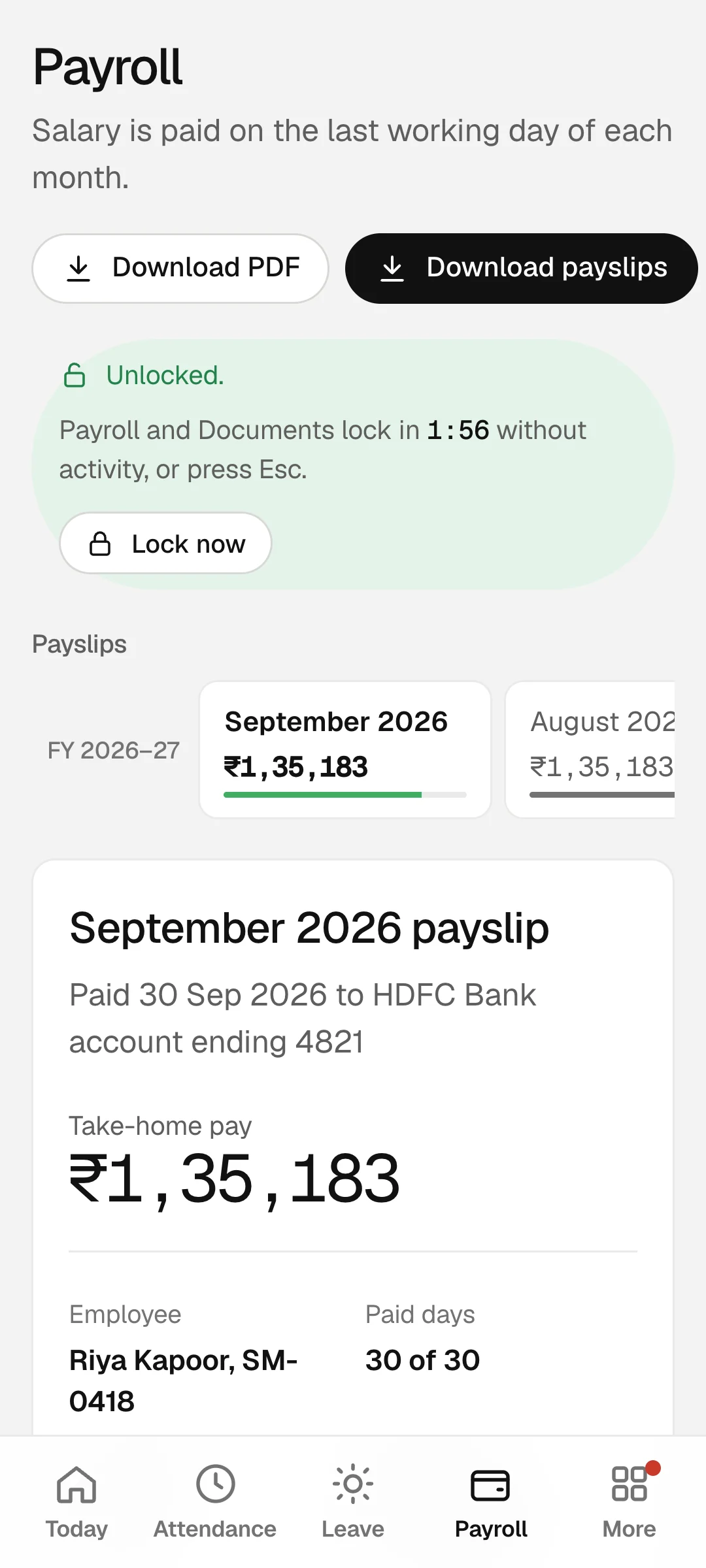
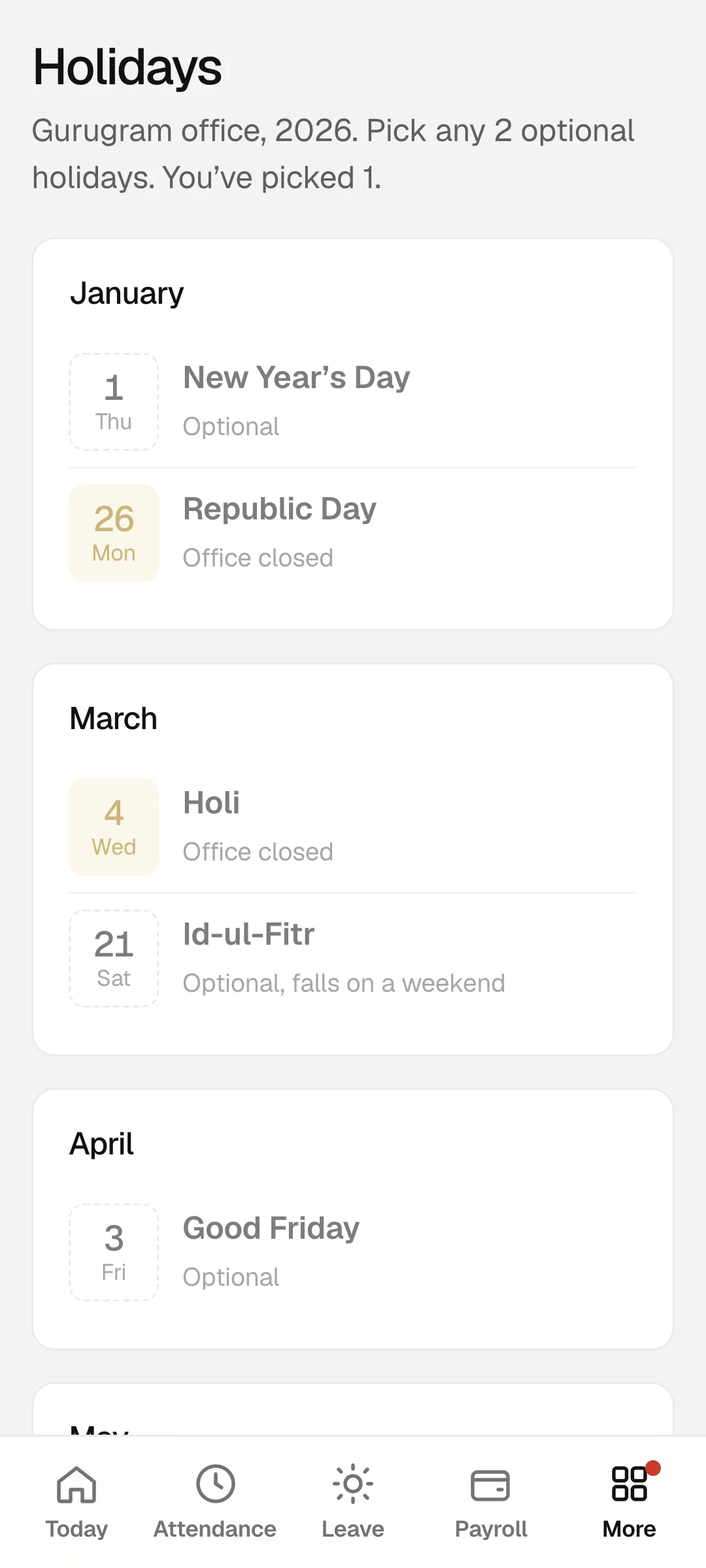
HR side
The month, on one desk
The HR side opens on the people overview and works down to the pay run. Every board leads to the next decision: fix a missing punch, approve the leave, then pay.
States and edge cases
The screens nobody plans for
A product is judged on its bad days: the missed punch, the forgotten password, the person who walks past your screen. These are designed as carefully as the happy path.
Five wrong PINs block the lock for 30 seconds. The last HR admin can't be downgraded. Moving someone with reports to Employee asks you to think twice. Forgotten passwords go to HR, not to an email nobody set up.
Name and brand
The in is a switch, and it's on
The product started as Punchcard and was renamed Inday: the day you are in. The logo sets in inside a green switch with a knob the size of the dot on the i, then day. It is built from the outlines of a real typeface, Urbanist Black, and the app itself is set in Geist with Geist Mono for numbers.
Are you in today?
The question on the sign-in screen, and the reason for the name
The build
Designed and built by one person
I designed Inday screen by screen against a demo that ran in the browser on sample data, so every flow could be tried before a single real record existed. The screens on this page come from that demo.
Then I gave it a real backend for TrueSpace. Each company's data is walled off from every other, and the database itself checks who can read what: you see yourself, managers see their team, HR sees the company.
- App
- Plain JavaScript, HTML and CSS, no framework
- Data
- Supabase: Postgres with row-level security by company, role and manager
- Sign-in
- Work email and password; HR creates logins and resets passwords
- Payslips
- PDFs made in the browser with jsPDF
- Privacy
- PIN or Touch ID in front of pay and documents
- Plan
- Supabase's free tier and Netlify: no monthly bill
What's next
Built, parked, ready for phase two
Google and Microsoft sign-in
Designed and built, then set aside to keep phase one free to run. The code is kept, ready to add back.
Password reset by email
The full reset flow exists in the demo: link, expiry, strength check. In phase one, HR resets passwords instead.
Sign-in with an email code
Also built, and also parked, because every code is an email that costs money to send.

(Hire me)
Need something like Inday for your company? Tell me what you're working on.
Hire Me